Crew sign in for job sites

Paper sign in sheets, retired.

TapIn is a tablet kiosk your crews sign in on in seconds. You get every name, signature and ID in one live weekly report, ready for any inspector. Stop worrying about fines over missing records.

Watch the 1 minute demo
English and SpanishInspector readyLive weekly reportInstalled for you
{{ sl.alt }}
Your colors. Your logo. Your building.
{{ current }}
See it in one minute

Inspector shows up? You're ready.

Watch a crew sign in, a new worker snap their ID, and a manager print the whole week for the inspector in one tap. No more worrying about fines over missing sign in records.

Pricing

Pick the plan that fits your site.

One price per job site, no matter how big your crew is. Use your own tablet, get a full kiosk from us, or let us handle everything. Tap Compare plans to see all three side by side.

Software only
$89/month
plus $299 setup, paid at sign up
The basics, on a tablet you already have. TapIn look only, no custom colors or logo.
The standard TapIn sign in screen
Live Weekly Report and Manage lists
Email support
Full kiosk
Most popular
$199/month
plus a $500 sign up fee that includes your first setup
Your own branded kiosk, with the hardware. We come and install it.
Your colors, logo and site photo
Tablet with a locking wall mount or floor stand
We install it on your site wifi
Set up and locked for you
Phone support
Return the kiosk when the job ends
VIP, done for you
$349/month
or $3,500 a year and save $688 (16%). No setup fee.
Everything in Full kiosk, and we handle the rest.
We move it to your next site at no extra cost
Built in cellular internet, no wifi needed
Rugged, drop proof tablet
Weekly Report emailed to you every Friday
Your own worker and supervisor video guides
Next business day tablet swap
Priority phone support
No setup fee
Swipe, tap the side, or tap a plan name to compare

Full kiosk: a $500 non refundable sign up fee that includes your first setup. Each new job site after that is a $299 setup fee. VIP: your first 3 months are paid at sign up, then cancel anytime with no notice. Both have a $500 equipment deposit right before we deliver, which comes back once the tablet and stand are returned with no damage.

Get started

Your plan
{{ sname }}{{ sprice }}
{{ c.what }}{{ c.old }}{{ c.amt }}
Ready to go?
Pay securely by card and we will reach out to schedule your setup.
Online payment is almost ready. For now, send your info below and we will send you a secure payment link.
{{ payNote }}
Have questions first?

We would love to answer them. Email info@tapinsites.com, or send your info below and we will get back to you within one business day. Nothing is charged until you are ready.

Your information
Please fill in your name, phone and email.

Compare plans

Prices are per job site.

Software only
$89/mo
plus $299 setup
Most popular
Full kiosk
$199/mo
plus $500 sign up
VIP
$349/mo
or $3,500 a year. No setup fee.
{{ r.label }} {{ r.a.t }} {{ r.b.t }} {{ r.c.t }}

Full kiosk: the $500 sign up fee is charged at sign up, is non refundable, and includes your first setup. Each new job site after that is a $299 setup fee. VIP: the first 3 months are paid at sign up and are non refundable, then cancel anytime with no notice. Full kiosk and VIP: the $500 equipment deposit is charged right before we deliver and comes back once the tablet and stand are returned with no damage. Full terms apply.

Paper sign in sheets cost you more than paper.

Names nobody can read
Scribbles and nicknames you can't match to a real person.
Companies left blank
No way to tell which sub a worker came with.
No ID on file
New faces walk on site with nothing to show who they are.
Fines when it matters
The inspector asks who was here last Tuesday, the sheet is gone, and you get hit with the fine.
For your crew

Signing in takes seconds.

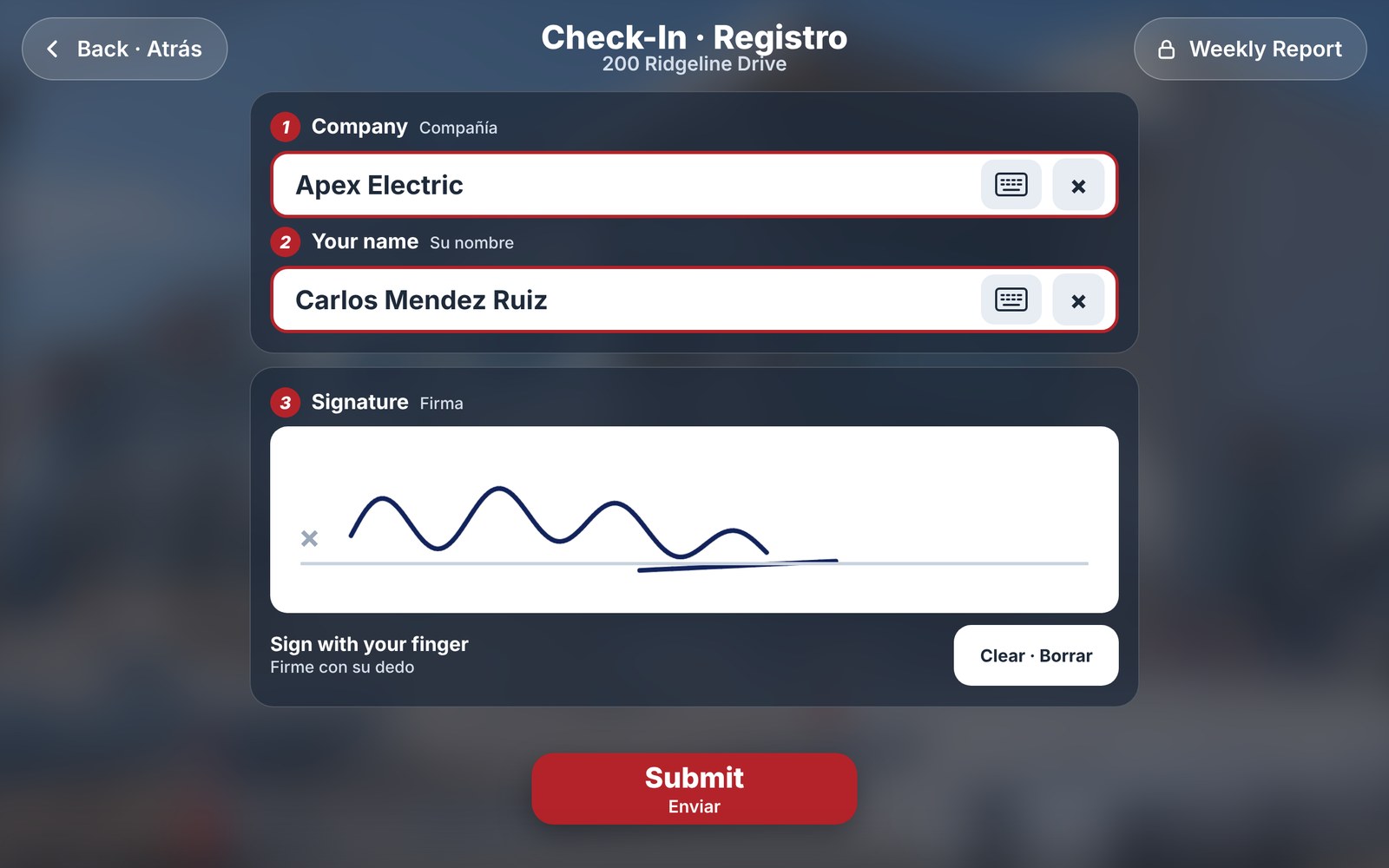
Big buttons, short lists and a keyboard only when it's needed. Every screen is in English and Spanish.
1
Tap, then pick your company and name
Short lists. Type the first letter to jump to it.
2
Sign with a finger
One sign in per person per day, with the time stamped.
3
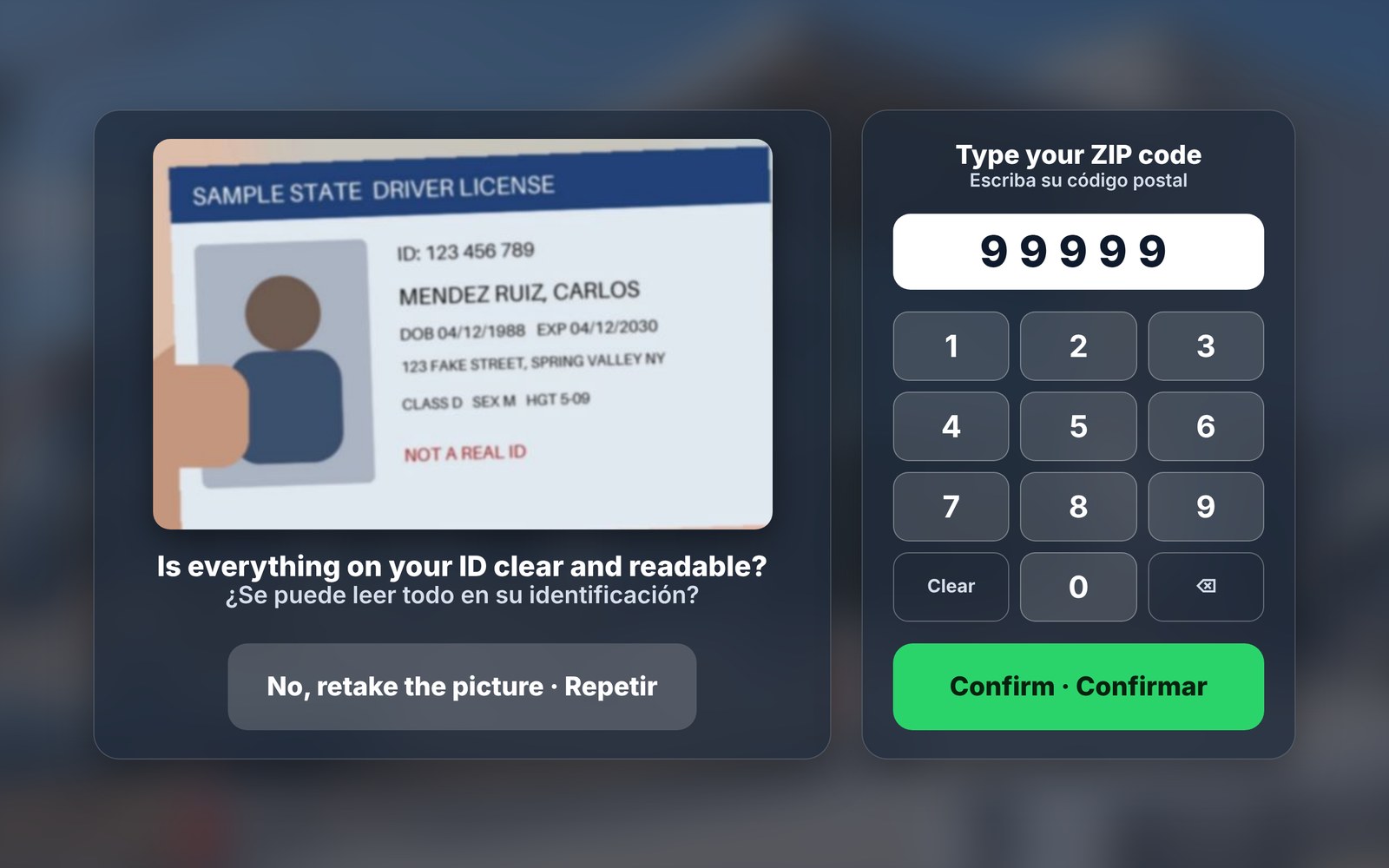
First time? Snap your ID once
The smart ID reader makes sure every new worker takes a clear picture of a real ID. Next time, they just sign.
Check in screen with company, name and a signature ID picture review screen with a ZIP code keypad, showing a sample ID
For managers and inspectors

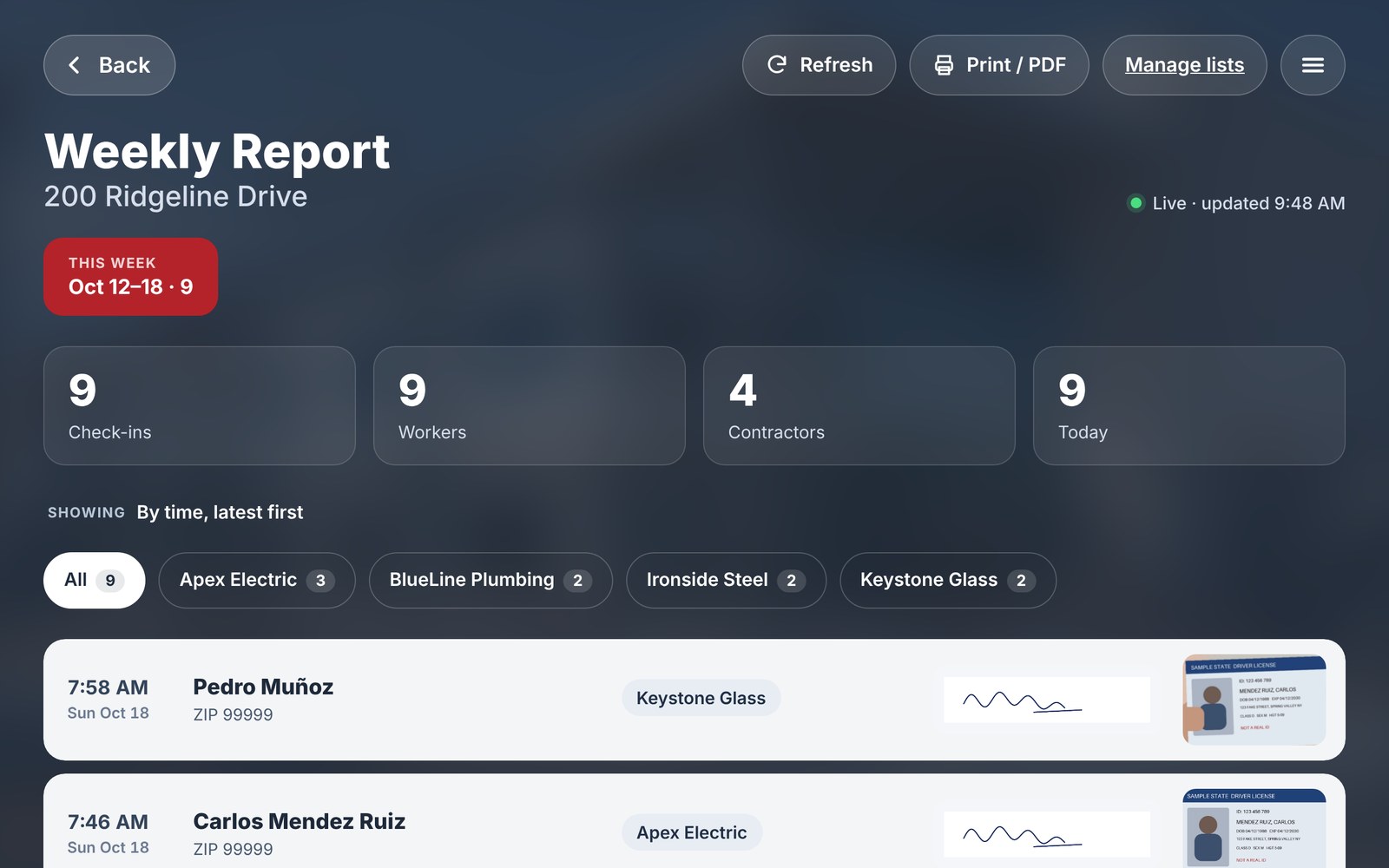
Every sign in. One live report.

Weekly Report with totals, company filters and sign in rows
Live weekly report
Names, times, companies, signatures and ID photos, updating as people sign in. Group by day, company or ZIP code.
Print for the inspector in one tap
Print or save the whole week as a PDF, sorted the way you like.
Fix mistakes in a swipe
Swipe a row to edit or delete. It always asks first.
Your lists, under your control
Add and rename companies, manage workers and import an existing list in a few taps.
Private by default
The report and the lists are behind their own codes. ID photos are only shown to supervisors.

Everything you need, set up for you.

Built and set up for you
Your kiosk, your companies and your codes, ready on day one.
Video guides for your team
With VIP, you get a worker guide, a Spanish worker guide and a supervisor guide, made with your own kiosk.
Private and secure
Each site has its own locked database. Your records are never shared or sold.
Works on a tablet you choose
Use ours, or bring your own tablet with a camera, locked to the kiosk.
English and Spanish
Every worker screen in both languages, with Spanish letters on the keyboard.
Updates and support
New features and fixes as TapIn improves. Email support on every plan, phone support with Full kiosk and VIP.

Questions

Do workers need an app or an account?
No. They walk up to the tablet and sign in. Nothing to download.
Who can see ID photos?
Only people with the report or admin code. The tablet never shows them to the crew.
Can we bring our current worker list?
Yes. Send it over, or import it yourself in Manage Lists.
Does the kiosk need wifi?
Software only and Full kiosk run on your site wifi. With Full kiosk, we connect it for you when we install. VIP comes with built in cellular internet, so no wifi is needed.
What happens when the job ends?
With VIP, we move the kiosk to your next site at no extra cost. With Full kiosk, we can move it too: every new job site is a new $299 setup fee, which covers a new site photo, updating your kiosk and installing it. Or return the tablet and stand, and your equipment deposit comes back once we check there is no damage. Your past reports stay available to print.
How long does setup take?
Usually a day or two. For Full kiosk and VIP, we also need your logo, colors and a site photo, then we set up a time to install.

See TapIn on your site.

Email us for a quick demo.

info@tapinsites.com
Yitzy Strasberg, TapIn